Nokia and Samsung along with another investor are investing $5.6 million U.S. dollars into Swype. This is an innovative technology that makes typing text with a touchscreen much faster.
The speed up as characters not exactly need to be touched. You can enter text with one continuous finger or stylus motion across the keyboard. Swype is already available on the U.S. version of the Samsung Omnia II (Windows Mobile 6.5) through Verizon Wireless.
The following movie shows how text by Swype on a Samsung Omnia II can be introduced.
The speed of text using this method can be introduced is compared to an iPhone. Check out the website of Swype for more movies.
The technology the company says is not only applicable to smart phones (with different operating systems) but also, for example televisions, navigation systems and game consoles.
The current hot product on the cell phone market is the brand new Nokia 5530 – The third ‘”Touch” phone by Nokia.
As you may already know, 5530 is a bit cheaper than 5800.
But what are the differences except the price?
The Nokia confirmed it has 5530 no UMTS / HSDPA.
If you want to surf the mobile is of course a clear downside.
Similarly, no GPS on board.
When 5530 is “only” a 4GB card in, the 5800 had 8GB of memory.
And has the display from the 5530 “only” 2.9 “compared to the 3.2″ from the 5800th.
Otherwise, thanks to symbian on the functions and capabilities produces pretty much the same ….. So if you don’t mind having GPS or UMTS, then I would still buy Nokia 5530 - it is smaller and more stylish.
I personally use a lot of UMTS (Internet) and I regularly use GPS. So I am completely satisfied with my 5800.
Would certainly be nice if that were slim and stylish as the 5530, but when I decided to do without GPS and UMTS must, then I would rather stay in 5800.
Here is a comparison of Nokia 5530 and its older brother called Nokia 5800 and their main features.
Nokia 5530 main features
The 5530 looks striking with its ’stainless steel’ cover. It offers a generous 2.9 inch screen in 16:9 widescreen aspect ratio (360×640 pixels) and a 3.2 megapixel camera. The device lacks support for UMTS / HSDPA and you do not have high speed internet will reach, unless you use the WiFi facility which fortunately still has. The solid battery (1000 mAh) ensures that your 27 hours for continuous music listening. By default you will receive a 4GB memory card, which accommodate more than 1000 unique mobile numbers.
Nokia 5800 main features
Nokia 5800 XpressMusic was the first touchscreen smartphone built by Nokia.
and according to specifications, seems able to stand comparison with the iPhone 3G.
This is a quadband GSM and UMTS with HSDPA, a 3.2-inch touchscreen with 640×360 pixel resolution and 16 million colors, for use with the included stylus, 3.2 megapixel camera with autofocus and Carl Zeiss optics, Bluetooth, Wi-Fi, integrated GPS, 140 MB of internal memory expandable and TV output.
5530 vs 5800 Image Quality Comparison Video
If there are any other differences you would like to point out please let others know in the comments below!
Nokia X6 is a touchscreen smartphone within a compact and square for music lovers, since it provides up to 35 hours of uninterrupted music. Not to mention the 36 GB of internal memory that stores a large number of tracks and more. other specifications of the phone include support for UMTS network, HSDPA, 3.2-inch display with 360×640 pixel resolution, Wi-Fi connectivity, a 5 megapixel camera with autofocus and LED flash, integrated GPS receiver with Ovi Maps on Symbian OS v9.4 S60 fifth edition, video calling, media player with graphic equalizer, playlists and other advanced features to play music at its best.
As we suspected, the Nokia X6 looks a lot thicker than you would (should) expect from a touchscreen device without physically qwerty keyboard.
X6 Video Review
This is partly because the device is designed that the top and bottom a little ’slope’ (see pictures below this Artkel), but the X6 is an extremely compact device. This course does not necessarily, but if you look to the first press photos that were raised or impressed. In practice, it falls in that area so a bit disappointing.
Which of course the Nokia X6 is a big improvement over many other devices, both Nokia touschreen itself and its competitors is the fact that the X6 is equipped with a so-called capacitive touchscreen. This makes operation and the perception of the Symbian S60 Touch UI much more comfortable and looks, and is all a lot smoother. Switching between menus, applications and browse the photo gallery is all just a little smoother, and smoothing back faster than the N97. You do not so hard to rub on the display. Owners of an iPhone or the Android phones that are already for sale immediately know what I mean.
Another nice detail is that the Nokia X6, like the N97 Mini, failed to provide a camera cover. For perhaps the thinking in damage (other than the now infamous cover) to prevent the camera from Nokia has the X6 slightly sunken in the back. Not much (no milimeter I estimate) but just enough to lay down and scratches on tables to avoid sliding. Of course that does not help against small keys and money in bags and (trousers) bags, but a touchscreen device you always in my one (hip) storage bag. Hopefully Nokia will soon be a standard protective bag or case in which is one of the drawbacks of the N97. That is not supplied. Buy yourself? Of course, but devices from 500 + Euro may (read: should) that I think is standard in the box.
All features of the device are adapted to the market segment where it is placed: the more expensive. With a Nokia X6 retail price of 459 euros plus VAT is the unit close to the iPhone.
Genuine Nokia fans, and there are many, they get the chance to buy an upmarket device that must lie alongside the iPhone. Whether it has enough appeal to whom the iPhone window beckons, do look up the other side, well over one months will prove if the X6 is actually in the store.
Simultaneously Nokia launches the N97 with its combination of touchscreen and keyboard, and the X3 for about 140 euros in the store will be a classic example with mobile access to the extensive portfolio of Ovi Music Store.
Nokia X6 Specs
Brand Nokia Type X6 Model Candybar Color Black / Red, White / blue Network [:: There are three basic networks available, GSM (= for EU and USA) CDMA (= for Asia) and 3G/4G (not region-specific). The network and the frequency, determine where the phone can be used geographically. Frequencies for the GSM network, dual band (= 900, 1800), Tri band (= 900, 1800, 1900) and Quad band (= 850, 900, 1800, 1900). The standard frequency for the CDMA network in 2000.] GSM 3G network, EDGE, GPRS, GSM, HSCSD, HSDPA (3G) Service 850, 900, 1800, 1900, 2100 Connectivity [:: Provides insight into the available connections, Bluetooth (= sending files via radio waves), Infrared (= sending files through infrared), Wi-Fi (= wireless network) and USB connection (via cable to a file = PC).] Bluetooth v2.0 with A2DP Infrared No Wi-Fi (WLAN) Yes JaMicroUSB USB v2.0 Fax / Data Yes Display [:: Here you type display, the number of colors, size and resolution of the main display. If there is one extra front display is also shown here (mostly by Shell Clamp phones).] Main display Color TFT touchscreen Color display 16.000.000 colors Size 81.28 mm. Resolution 360 x 640 pixels External display No Memory [:: Besides the internal memory, most new mobile phones also have the opportunity to expand the memory with an external memory card. You can also find here the type of memory that the memory is expandable.] 32GB Internal Memory No expandable memory Memory slots No No Storage Medium Performance [:: There are two common types of batteries, Lithium Ion and Lithium Polymer. Lithium Polymer batteries are developed along the lines of Lithium Ion batteries, and others have the advantage that they are not combustible. The number of hours the phone with full battery pack can be displayed at the stand-by time (= at least use) and talk time (= to much use). Temperature changes can affect these values.] Battery Standard battery, Li-Ion 1320 mAh (BL-5J) Standby time 401 hours Talk time 8.5 hours Call [:: Provides information about whether to have a vibrating alarm and the possibility of a photo-ID to a phone number to add. Furthermore, the different types of mobile phone ring tones support as the standard monotone polyphonic ringtones, or more like MP3 ringtones.] Vibrate alert Yes Photo ID Yes Ringtones MP3, Polyphonic Camera [:: If the phone has a digital camera here parts as the amount Megapixels and the presence of digital and optical zoom defined. Also find here information about the presence of a video function and half (front) camera to conduct video calls.] Camera Yes Megapixels 5 megapixels Maximum photo resolution 2592×1944 pixels Digital zoom Yesx Optical zoom No Autofocus Yes Flash Yes Video Recording Yes Second (front) camera Yes Messaging [:: Functions as SMS (= text messaging) and MMS (multimedia messaging =) are now appointed, along with whether to have a T9 predictive text feature. Furthermore messaging options like browsing the Internet and have e-mail on your phone defined.] SMS Yes MMS Yes T9 text function Yes E-mail Yes Internet browsing Yes Entertainment [:: Extra options as an FM radio and Java are specified here. If the phone has an MP3 player under the title, this audio player included, while the supporting file types are described. Furthermore, here, if applicable, the type of video function can be found.] FM radio Yes Java Yes Audio player AAC, M4A, MP3, RA6, WAV, WMA Video player 3GP, MP4, RV, WMV Features [:: If you yourself can add ringtones to this phone are included here, along with whether to have a video call feature, which can be a video conversation. In addition, various organizer functions specified here. You will also find other details any additional features of the phone.] Add ringtones Yes Organizer Document viewer (Word, Excel, PowerPoint), Voice command / dial, Handwriting recognition Video call No Other features Symbian OS v9.4, Series 60 rel. 5, Auto turn-off, Auto-rotate, 3.5 mm audio jack, touch Dedicated music keys, GPS with A-GPS support; Ovi Maps 3.0, TV-Out Format [:: Subject information about the weight and dimensions of the phone. When the weight is the number of grams of the phone including battery included. The dimensions are shown in Height x Width x Depth.] Weight 122 g. Dimensions (H x W x D) 111 x 51 x 13.8 mm.
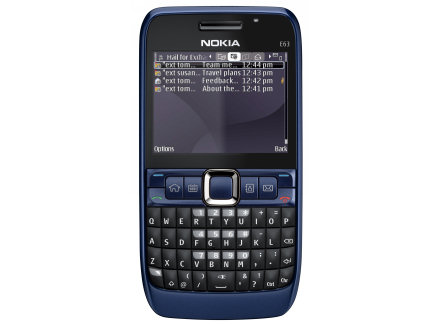
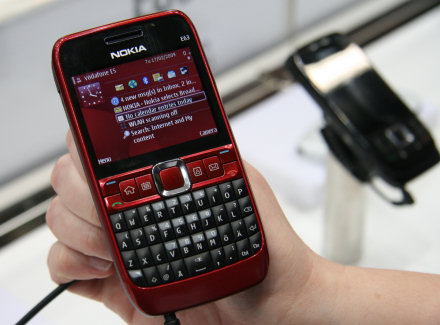
Meet the casual twin brother of the Nokia E71 – Nokia E63. The Nokia E63 is only 13 mm thick but still has all the features you expect from a modern smartphone. With the E63, you include in your pocket over Wi-Fi and a 2-megapixel camera. And there have long to enjoy the E63 has a big battery. So you’re looking for a stylish all-rounder with a striking appearance, then the Nokia E63 is the perfect choice.
Here is our review of Nokia E63. I hope you find it useful to you.
Design
Look simple but colorful, rounded and qwerty keyboard for the Nokia E63. The display is a large 2.36-inch QVGA TFT with a resolution of 320×240 pixels and can display up to 16 million colors. The dimensions are 113 mm in height, 59 mm wide and 13 m thick. The smartphone is available in colors Ultramarine Blue and Ruby Red. Features and functionality
The Nokia E63 was introduced late last year to widen the range of Nokia smartphones equipped with a dedicated messaging and qwerty keyboard. After the huge success of the Nokia E71, the manufacturer continues to fly the same route, creating mechanisms to those who need to manage effectively the private life and work, keeping them separate anyway.
One of the coolest things about this smartphone is, of course, the ability to shift at the touch of a button, the display of business e-mail and appointments to the way staff, which allows you to view e-mail privacy, the blogs and photos of friends, without work invades privacy.
Past, however, the description of the technical specifications, the Nokia E63 is a smartphone that supports full quadband GSM and UMTS networks, utilizing the whole, the frequencies 850, 900, 1800, 1900 and 2100 MHz, providing network coverage exceptional worldwide. There is the built-in modem and WAP browser for surfing the Internet and the technologies GPRS and EDGE, but not HSDPA for data transfer.
Wi-Fi connectivity, however, allows you to surf the Internet using free hotspots while thanks to the USB port and Bluetooth you can synchronize data with those of other mobile devices. To finish with the technical specifications, the smartphone is based on Symbian OS 9.2 S60 Edition 3.1.
As for the features offered by the Nokia E63, the phone starts to be mentioned integrated speakerphone, vibration, speed dialing, the voice dialing, conference calling, contacts with images, voice recording, VoIP and Push to talk, but the latter is necessary to verify the coverage with the network operator. Not lack of support SMS, MMS and email, with support for multiple accounts.
With Mail for Exchange Mobile Client simply pull your e-mail to the E63. This smart smartphone is known by more than a thousand internet service providers including Gmail, Hotmail and Yahoo. You are in handling your e-mail assisted by the full keyboard. And that comes in handy when quickly typing an email. You can also synchronize your calendar and contact sharing with your PC or laptop. Multimedia Monster with 3.5 mm jack
The Nokia E63 knows perfectly board with making movies, photos and listening to music. Take for example images with the 2-megapixel camera. Or listen to your favorite music with the uitgebriede player. Equipped with a 3.5 mm jack is also any standard headphone to connect to the E63. For all your pictures and music to expand the memory up to 8 GB, enough for more than a thousand songs. The battery of the Nokia E63 is good for up to ten hours non-stop calling or listening pleasure.
As regards the sector of leisure and entertainment, the E63 includes a 2 megapixel camera, so not exactly glamorous, but still with lots of functions such as CMOS sensor, digital zoom, flash LED, balancing White, the viewfinder, the application of various color modes, self timer, and of course, the possibility of making movies, videos. The secondary camera is used instead for video calls.
Even the music industry is very complete in that the Nokia E63 is equipped with a media player that supports video and audio files in MP3, AAC, AAC, WMA, MIDI, 3GP, MPEG-4, H.263, and an integrated FM radio, thanks to which you can listen to their favorite songs at any time. Be emphasized, finally, the role Files on Ovi, which provides access to files on your computer remotely, even if it is not connected.
Not missing, then the presence of QuickOffice, which allows you to view documents in popular formats, but not edit them or create them. As for saving photos, videos, songs and more, the smartphone has an internal memory of 110 MB, expandable via microSD. Miscellaneous. Finally, the power is ensured by a rechargeable lithium-ion 1500 mAh battery, capable of providing a range of up to 480 hours standby and 11 hours talk time. For more specific technical details about E63 read our post Nokia E63 specs.
Pros: Wi-Fi and Bluetooth, UMTS, 16 million color s; corporate email support
Cons: Camera improvable; No GPS, HSDPA No, No Pocket Office
Conclusion: The Nokia E63 smartphone is certainly one interesting feature-rich but with some flaws, namely the lack of HSDPA, and fast connectivity, the quality of the camera and, most important, and not only QuickOffice Pocket Office, in a nutshell you can only view documents but not edit or create that for a device designed for mobile workers, it is really a downside. The rest of the specifications is a good standard.
It’s been a week since I started playing with the Nokia N97 and now it’s time for my review of the hardware. I’ve been waiting for this phone for a while and I’m excited it’s finally here. I have reviewed a Nokia N97 prototype before, and the final retail version hardware isn’t that different. I’ll let you know what I think of the physical aspects and continue with my usual posts of usage experience and thoughts.
The Nokia N97 in this review is the Euro version (RM-505) running firmware version 10 dated May 15th, 2009.
You may want to also want read these previous posts:
* Nokia N97 Review of a Prototype * Hands-On With The Nokia N97 * Vlog: Nokia N97 First Impressions in HD
Size
On paper, the Nokia N97 isn’t that much thicker or longer than a candybar phone like the Nokia N82, but the combination of the extended measurements makes the Nokia N97 feel big in the hand.
Build
The build quality of the Nokia N97 is really good. It feels like an expensive device just holding it in my hands. The edge of the N97 is wrapped in a chrome-looking material while the rest is either white or black depending on the the version. I don’t hear loose parts when I shake the phone or hear any creaks when pressing into the body.
The slide mechanism is rock solid. I hear the nice click-clack sounds and find myself opening and closing the slider just to hear it. I don’t notice any wobbles at all either.
Keyboard
The keyboard on the Nokia N97 separates reviewers. Some hate it while others love it. I think those who hate it only used the phone for a couple of minutes. After testing the keyboard with several emails and text messages, I have to give thumbs up to whoever designed this. It’s not perfect, but it is pretty damn good!
At first, it felt weird because the spacebar is located on the right, but it actually works well because it is comfortably placed under my right thumb. I’m not sure if this makes it very uncomfortable for left-handed persons, though.
Keyboard buttons on the Nokia N97
Complaints. I can type really fast on the Nokia N97, but there’s room for improvement. The keyboard is not perfect. Here are a couple of my complaints:
To type a number, I have to press the function key on the lower right corner, then the corresponding button on the top row. I’ve used plenty of T9 and Qwerty phones and the numbers have always been accessible by simply holding a button. This is not the case on the Nokia N97. Implement this ASAP please!
Another problem I notice is the buttons’ feedback. By default, the keypad tones are on. I suggest leaving that ON because it helps you feel (or hear) that you are pressing the buttons. The Nokia N97’s buttons pop out for separation, but they don’t go down very much when you press down. Tactile feedback is certainly there, but not much. Leave the keypad tones on and you should be fine.
Display
The Nokia N97 has a 3.5 inch touchscreen at 640×360 resolution. It looks great from an arm’s length. The colors are bright and images appear sharp, but I notice some things up close.
There are grey diagonal lines that are fairly noticeable on white backgrounds. It’s not visible when darker images are shown on display. You really have to put your eyes within inches of the display to notice.
The front of the Nokia N97 is glossy, making the colors on display richer, but it also makes it hard to see the screen on bright sunny days. This is a problem found on many devices with a glossy display, though.
Keylock
I like having dedicated keylocks to prevent accidental keypresses when the device is in my pocket. The Nokia N97 has one, but it doesn’t work 100% of the time.
Before I put it in my pocket, I slide the keylock and the display turns off. Later on when I take it out of my pocket and slide the keylock, I get random results. Sometimes it will unlock and sometimes it won’t, forcing me to slide it again. I hope this is something they fix in a firmware update.
Battery Life
I’m satisfied with the battery life on the Nokia N97. It features a 1500mAH Nokia BP-4L similar to the Nokia E71. From my typical usage, I’d have a full charge at 9AM and one bar by 9pm. If I don’t touch the phone at all, I’m sure it can go on for days.
Removable battery
My typical usage includes replying to push emails via Nokia Messaging, push calendar and contacts via Google Sync, taking photos and tweeting them immediately via Pixelpipe, commenting on friends’ photos via Share Online, comment on my friends’ wall posts on Facebook, checking Twitter for Nokia news via Gravity, some web browsing, and some quick phone calls here and there.
According to the official Nokia specs:
GSM Talk Time up to 9.5 hours
WCDMA Talk Time up to 6.0 hours
GSM Standby Time up to 18 days
WCDMA Standby Time up to 17 days
Video Playback Time up to 4.5 hours
Video Recording Time up to 3.6 hours
Music Playback Time up to 40.0 hours
Charging. You can charge the Nokia N97 via the mini-usb cable connected to a computer or the power adapter. A nice addition I like is the light next to the port. It lights up when the phone is charging and turns off when fully charged.
Internal
I don’t like talking numbers and specs because it’s way over my head. It’s more important for me to use the device and how it performs. The Nokia N97 has a 434MHz CPU and 128MB RAM compared to the iPhone 3GS that features 600MHz CPU and 256MB RAM. You can never have too much RAM or CPU so it would have been beneficial if the N97 had more of both.
Navigating through the menus is snappy. Running apps produce mixed results. For example, The Garvity app is really fast and works pretty good. The web browser is fast, but lags on larger sites like Techmeme. A more accurate demo is available from my first impressions video.
When you have too many apps running in the background, the Nokia N97 decides to close some apps you aren’t currently using to preserve memory. For example, if I open the Gallery, web browser, Gravity, calendar, camera, it might close the gallery and sometimes Gravity without warning.
This can be good or bad. Good: Nokia N97 remains snappy with enough RAM to run your current app. Bad: You have to reopen the application that was closed. I’ll write more about the software and performance closely in an upcoming post.
Storage. The Nokia N97 comes with 32GB of internal storage, but you can add another 16GB microSD card for a total of 48GB. This is great for storing lots of music, photos, and videos.
microSDHC slot on top of the micro-USB port.
Camera
The Nokia N97 has a 5mp camera featuring Carl Zeiss lens and protects it with a cover. People want lens cover and Nokia listened. Sliding the lens cover automatically opens the camera app where you can take photos and videos. This is great for multitasking.
Nokia has been producing quality cameraphones for a while now andthe N97 isn’t an exception. The quality is up there, but the Nokia N82 still remains the leader when it comes to night photography.
5 megapixel camera Carl Zeiss lens with cover
Pressing halfway autofocuses on a subject and pressing all the way snaps the pic. The camera button is really good too. I already mentioned in my first impressions that it’s the best camera button compared to my other recent phones.
I’ll have another post where I dig deeper into the camera functions and review the quality of the photos. For now, you can check my uploaded live tweeting photos on Flickr, and see which ones were taken with the Nokia N97.
Mac Users Beware!
Update: NMT was updated to support the Nokia N97. As of writing this post, the Nokia N97 is unsupported by Nokia Multimedia Transfer and Nokia Maps Uploader on Mac. This means I can’t connect the Nokia N97 via “PC suite.” This also means, I have to run Windows on my Mac to use the Maps Uploader. I am forced to use mass storage mode when transferring music, videos, or photos which means I can’t receive phone calls or emails while using it. A positive thing that comes out of this is that the app doubleTwist for the Mac works incredibly on devices using mass storage mode.
Of course, you can skip all this trouble by sending files via bluetooth between the Nokia N97 and computer.
Hardware Wrap-up
To wrap-up the hardware review, I’ll list the important things I mentioned about the Nokia N97.
Positive: Top-notch build quality. Great keyboard design. High-resolution display. Big storage space. Acceptable battery life. Excellent camera.
Negative: Need to press two buttons to type a number. Diagonal lines visible on screen with white backgrounds. Keylock randomly needs two slides to unlock the phone. Keyboard buttons provides minimal tactile feedback. No Mac support yet.
The Nokia N97 hardware is so freakin’ sexy, but it’s not currently in its full potential. The negatives I mentioned on this review can be fixed through firmware updates, except the diagonal lines I mentioned. An update is already available inside Nokia hinting a more sensitive touchscreen. Don’t let us wait too long!
The Booklet 3G is Nokia’s first netbook, but they’re trying not to label it as such. It’s supposed to be a mini laptop for all-day mobility allowing up to 12 hours on a single charge. It looks great, too. The Nokia Booklet 3G’s chassis is made from a single piece of machined aluminum, similar to Apple’s Macbooks. How do I like it? Read on for the review.
Hardware
Size. The Nokia Booklet 3G’s dimensions are 10.4 x 7.3 x 0.78 inches. It weighs 2.76 lbs. It won’t be pocketable like Nokia’s phones, but it’s smaller than most of my old college textbooks. It can also easily fit in a backpack.
Build Quality. The Nokia Booklet 3G feels really solid in the hands. I wouldn’t try, but it gives an impression that it could withstand a fall. The laptop is mostly visibly aluminum with the exception of the glossy plastic cover on top of the lid. It’s not removable, but models come in black, ice (white), or azure (blue). It’s upscale looks really matches its build quality.
Internals. Inside the Nokia Booklet 3G is is an Intel Atom Z530 1.6 GHz with a soldered 1GB DDRD RAM that is not upgradeable. It includes 120GB 4200 RPM hard drive for storage. For more details, check the full specifications.
I’m a little disappointed with the performance. I’m a demanding user, but even simple multitasking seems to lag on the Booklet 3G. I couldn’t browse the web smoothly while Windows 7 was pestering me about stuff about available updates or that the virus protection was expiring soon. Even just browsing with multiple tabs seem to give the Booklet some trouble. I’m also shocked that Hulu videos are chopp y. Fortunately, Youtube seems to play well.
Display. The Nokia Booklet 3G provides a 10.1 inch display with 1280×720 pixels resolution on glass. Glare and reflection is noticeable at some angles, but I prefer to have a glossy display over matte. I wouldn’t say the display is dim, but it’s comfortable at maximum brightness. The viewing angle isn’t that great, with details being lost if tilted too open or closed. Fortunately the hinge lets you tilt the Booklet 3G to almost 180 degrees to compensate.
Keyboard. The Nokia Booklet 3G keyboard buttons are slightly smaller than those found on regular laptops, but not so much that it hinders typing. Tactile feedback is great. I didn’t have problems writing emails, tweets, or filling out forms on the browser. Although, those with bigger fingers might disagree. There’s a dedicated Nokia button than opens the Nokia Social Hub software. I’ll talk more about that below. What I don’t like about the keyboard is that I have to hold and press two buttons to adjust volume, or screen brightness. There’s also a noticeable delay between pressing the brightness/volume button an actually making the adjustment.
Multitouch. Contrary to Engadget’s review, there is actually multitouch on the Booklet 3g’s trackpad. Scrolling is possible with two fingers and zooming can be done with pinching. It’s not exactly smooth, but it’s there.
Inputs. The Nokia Booklet 3G provides an HDMI port so you can connect to a TV or projector to watch movies or give presentations. I plugged it to my 32in HDTV and it worked right away. There are also 3 USB 2.0 ports, 3.5mm audio jack, slot for an SD card, and another for SIM. The door to access the SIM and SD cards is tough to open unless you have long nails or a paper clip. Nevertheless, I rather have a tight door than a loose one.
Speakers. The speakers on the Nokia Booklet 3G can be loud enough. They are located at the front on both sides. The quality isn’t bad, but it’s also not that great. I noticed the included Nokia Headset WH-205 that also came with the Nokia N900 sounds better on the N900 than the Booklet 3G.
Software
Windows 7 Starter is pre-installed on the Nokia Booklet 3G, but it’s upgradeable to Home Premium using the Windows Anytime Upgrade. I used my student discount to upgrade for only $29.99. Features missing on the Starter version include ability to change dektop wallpaper, but more importantly the Aero interface. I don’t see why Nokia decided to stick to Starter especially at the price it’s trying to sell.
I’m a Mac user and this is my first time playing with Windows7. I love the Exposé feature on my Mac. Aero on Windows 7 seems just as useful. Pressing Alt+Tab or WIN+Tab rotates through currently opened applications. The two methods show it differently, but I like the WIN+Tab better. Windows and taskbars are also translucent, which I think is appealing. I also like the subtle transitions when closing and opening applications.
Nokia Social Hub. With Nokia Social Hub, you can read your text messages and access social utilities likeTwitter, Flickr, and Facebook. It’s similar to other tools like Seesmic Desktop or Tweetdeck. This is a must-have app on the Booklet 3G if you are planning to use SMS messaging from the mini-laptop.
Ovi Maps Gadget. Windows 7 users can have widgets or gadgets on their desktop and Nokia included one for GPS location. It was able to find my location outside my brick apartment building in less than a minute. I thought clicking on the gadget would open a bigger Ovi Maps app with more options to play with but that’s not the case. Okay, so the Booklet 3G knows where I am… now what?
Ovi Suite and Software Updater. The Booklet 3G also includes the Ovi Suite where users can sync their calendar, contacts, media with other devices and the cloud. Software Updater checks for any updates specific to the Booklet itself.
Connectivity
Staying connected isn’t a problem for the Nokia Booklet 3G. Along with wifi, it can connect to a carrier network. Here in the US, the Booklet comes with an AT&T DataConnect Plan for 3G access. They also provide access to their WiFi hotspots nationwide. An application is included to show the location of these access points. I see a lot of McDonalds’ on the list.
Battery
I think the key selling factor for the Nokia Booklet 3G is the battery life. I can actually carry it around without bringing the power adapter. The removable battery was rated to provide up to 12 hours on a single charge, but I found my typical usage to last about 8 hours. I think that’s still pretty good.
Verdict
The Nokia Booklet 3G is a good-looking solid hardware. The battery life is really impressive as well. However, I think it is disappointingly underpowered. I wish it was faster at opening applications. I wish I can watch Hulu videos. I wish I can run multiple applications without slowdowns. Nevertheless, if you are just going to use the Booklet 3G for small tasks and light browsing on the go without being tied to WiFi, then it could be for you. Here in the US, it costs $299.99 with a two-year AT&T DataConnect contract and $599.99 without the contract.
It’s hard to like the S60v5 again after using a Maemo device like the Nokia N900. I’ve been trying to use the Nokia N97 mini to write a thorough review, but I always ended up putting it down quickly. Want to know what I think in one sentence? The Nokia N97 mini looks damn good and packs a lot of features, but I would recommend other devices before this one.
Hardware
The Nokia N97 mini was well-designed. It’s shiny with nice combinations of curves and lines. It feels good in the hands, too.
Size. It’s a little smaller than the Nokia N97 making it more pocketable. Here’s a size comparison between the two N97’s. I didn’t have problems putting it in my jean pocket.
Build Quality. Nokia added stainless steel to the back of the phone with the battery cover and the camera bezel. It adds a premium look and feel to the hardware. The hinge for the slider is very smooth, yet provides nice reassuring clicks when the device is closed or open. The N97 mini is a solid device. I found no wobbling, creaking, or loose parts to complain about.
Internals. Inside the Nokia N97 is a single-core ARM 11 microprocessor clocked at 434MHz with 128MB RAM. That’s similar to the original Nokia N97. It isn’t a powerhorse if you compare it to other recent devices. For example, the Nokia N900 runs at 600MHz with 256MB RAM. A big concern for power users is the RAM. I found that running multiple applications like Gravity for tweets, web browser, Mobbler for streaming music, and Nokia Messaging for emails take up a lot of the RAM. This could be good or bad depending on how you look at it, but the phone silently closes one of those apps without warning to free up memory. This wouldn’t be a problem if Nokia gave the N97 256MB RAM instead.
Display. The Nokia N97 mini has a 3.2 inch touchscreen display with 640×360 resolution and 16:9 aspect ratio. The pixel density of 229 PPI makes it relatively sharp. Let’s compare it with other touchscreen devices.
Apple iPhone 3GS: 165 PPI
Nokia N97: 210 PPI
Nokia N97 mini: 229 PPI
Motorola Droid: 265 PPI
Nokia N900: 267 PPI
I can’t really say if the screen on the Nokia N97 mini is responsive or not because of inconsistencies. Scrolling through lists and pages varies between applications. It’s sometimes smooth and fast on one application, while slow on another.
Keyboard. I’m a fan of the Nokia N97 mini’s keyboard. I got used to the layout very quickly found myself typing texts and emails really fast. Unlike the Nokia N900, there are actually spaces between the buttons so they don’t feel cramped. The buttons provide adequate tactile feedback, but I recommend leaving the keyboard sounds ON for a better typing experience. Just like the the 2.0 firmware on the original Nokia N97, long-press on the keyboard outputs the corresponding symbol on top of the letters.
Nokia provides an on-screen alphanumeric keypad for those who prefer not to slide out the real keyboard. Handwriting is also an input option. Since I like the keyboard on the Nokia N97 mini, I never used these two other options. On-screen Qwerty is not currently supported.
Camera. The Nokia N97 mini packs a 5mp camera with Carl Zeiss lens and dual LEDs flash. It’s similar to the original setup on the Nokia N97, but the flash is now separated from the lens to prevent it from bleeding into the photos. I’ve been impressed with the Nseries line from Nokia in regards to camera quality and the N97 mini is no exception. It takes great photos outdoors as long as there’s enough light. Of course it’s no match for my DSLR, but for quick snaps and sharing online, it’s a great camera you can bring everywhere. Don’t bet on getting great photos at a bar or club though. The dual LEDS is simply not strong enough to capture friends dancing at the club.
Video recording on the Nokia N97 mini is fine, but I wish it offered more. It records at 640 x 360 at 30 frames per second by default, but there’s an option to record VGA (640×480) too. I like that you can use the LEDs to provide light for video. I wish there was autofocus because the Nokia N97 mini seems to lock focus on far objects. This is great for landscape videos, but people talking to the camera could be sharper. Forget about objects up close.
Speakers. After some usage, I find the speakers on the Nokia N97 mini loud but found it better to use earphones. The included earphones did pretty well when I listened to music full of bass and hard-hitting beats. There’s a 3.5mm audio jack for those who want to use their own headsets.
Software
The Nokia N97 mini runs on S60 5th edition. I am no longer a fan after using other systems like Apple’s iPhone, Google’s Android, and Nokia’s newer Maemo OS. I found the S60v5 interface required more presses to get things done.
My main complaint about S60 5th edition is the inconsistency. Even when I’m currently connected to the wifi on the web browser, opening another application that needs connection still asks what connection to use. Different applications also require different flicks for scrolling. For example, the screen responds immediately at the menu lists, web browser, and the twitter app, Gravity, but the email application like Nokia Messaging requires a lot more flicks to scroll. Some menus also won’t scroll the page but highlights the text instead. The keylock sometimes needs to be flicked twice to turn the screen back on. This really didn’t bother me much until I’ve seen how it’s done elsewhere.
Widgets. You can install widgets on the home screen of the Nokia N97 mini. These are useful to get quick information without the need of opening individual apps. Android and Maemo however already improves on this by allowing users to have more than one page of widgets with different sizes. On the N97 mini’s homescreen, I included Facebook, calendar, music player, email, app shortcuts, and clock.
Email. Out of the box, users should avoid the default email application on the Nokia N97 mini and inst all Nokia Messaging right away. It provides push email with HTML support. While Nokia Messaging on S60 is better than the default email application, the email experience is much better on iPhone, Android, and Maemo.
Browsing. The browser on the Nokia N97 mini is works fine and the kinetic scrolling looks good. Flash content like embedded Youtube videos can play within the webpages without opening another application. I recommend viewing pages in landscape view because I found some websites not rendering properly in portrait view. Zooming is done with double-tap and there’s no support for pinching or multi-touch. Performance-wise, it’s not as fast as the other browsers found in the Nokia N900 or the iPhone. Users might want to check out a popular alternate browser called Opera Mini 5. I found it to be faster especially when loading larger pages.
Music. Instead of owning music albums or downloading music, I prefer discovering new songs by streaming via last.fm or Pandora. Fortunately, there’s an app for that on the Nokia N97 mini. It’s called Mobbler. The traditional way of listening works fine as well. I transferred an album via bluetooth from my Macbook and it showed up in the music library. Album art was supported. I don’t think it’s a dealbreaker, but Nokia dropp
ed the FM transmitter in the Nokia N97 mini.
Mobbler and Music Player
Ovi Maps. Unlike the Ovi Maps in Maemo, Maps for S60 is actually pretty good for navigation. It’s not free, but a 30-day license in the US is available for about $7. I’m not sure about other regions. If you’re searching for places, I recommend finding it on the Google Maps application and bookmark it for later use on Ovi Maps. Walk navigation is surprisingly useful too. It helps guide you along pedestrian areas, parks, or over crossings while walking. 3D landmarks display buildings for better orientation.
3rd-Party Apps. The Nokia N97 mini came with a bunch of pre-installed apps and more can be found within the Ovi store. Some of my favorites are
* Handy Taskman – Task manager that also lets you view RAM usage * Gravity – Really good Twitter application. * Qik – Stream live video from your phone * Pixelpipe – Upload and share your media to more than 100+ services. * Boingo – Use your phone’s data connection as a wifi access point to connect your other devices like a laptop.
Handy Taskman and Gravity
Cellular
I have no complaints with the call reception on the Nokia N97 mini. The earpiece seem loud enough. Voice command is activated when holding the green call button and incoming calls can quickly be put on silent by flipping the device over.
Battery Life
The Nokia N97 mini includes a 1200mAh battery. It survived a whole day of my normal usage that includes taking some photos, making calls, checking emails, tweeting, and browsing the web. Official measurements by Nokia rates it at 7.1 hours of GSM talk time and 4 hours of WCDMA. Standby time goes up to 13 days while music playback goes up to 28 hours.
Verdict
The Nokia N97 mini is a good-looking phone and offers a lot of features for those want to do more with their device than just make calls or text messages. However, there are inconsistencies within the OS that leave room for frustration especially for new users. I wouldn’t recommend this phone as anyone’s first touchscreen device. If you already love your S60v5 device like the 5800 or the original Nokia N97, then maybe the N97 mini’s appealing looks, sleek body, and great QWERTY keyboard make it a worthy gadget for your pocket.
The Nokia N900 was just announced that it started shipping on Tuesday. I’ve been using a pre-production version for a month now and just updated to the production firmware (1.2009.42-11). I’ll edit this review when I get my hands on a production hardware model and notice any difference. Want to know what I think in one sentence? I like the Nokia N900, but Nokia still has a lot of work to do.
Prelude
One of the reasons I started this blog was to share my experiences using what I believed were the best phones created. When the Nokia N70, N93, and N95 8GB were released, I thought everyone else’s phones were garbage. I was happily taking photos, videos, checking the web, my email, and navigating with the built-in GPS while most of my friends were just happy with SMS and making calls on their phones.
But then the iPhone 3G and 3GS came out. Now my friends, their parents, and their grandparents can do what I’ve been doing because Apple made it easier, faster, and prettier to use.
I’m a phone fanatic and always want the best. Unfortunately, I did not feel I was using the best devices anymore when I got the Nokia 5800 and the latest flagship, Nokia N97. That’s why I was excited when the Nokia N900 was announced to run on Maemo. I wanted something new… not just a touch-optimized layer placed on top of the previous S60 OS.
I’ve been asked several questions when I show the Nokia N900 to friends. Do I feel the Nokia N900 is the best device to have right now? Is it better than the iPhone or Android? Read on to find out.
Hardware
Size. If you’re updating from a Nokia N97, the N900 it’s slightly thicker, shorter and heavier. It’s pocketable, but you’ll feel that it’s there. If you wear skinny jeans, you might want to carry this in your coat pocket or belt case, instead. Check out the size comparison between the iPhone vs N900 vs N97 vs E71.
Build Quality. The build quality of the Nokia N900 is fine. It seems plasticky, but it’s not terrible. The slider locks on to place with nice reassuring clicking sounds and the hardware buttons like the camera, keylock, power, and qwerty are firm. It’s not a dealbreaker, but my pre-production N900 makes a little creaking noise when I squeeze on the side of the device. Some metal would have been reassuring, but it would make the N900 heavier than it already is.
Internals. Inside the Nokia N900 is ARM Cortex – A8 microprocessor running at 600 MHz with 1GB (256MB RAM + 768MB virtual memory). It’s the same CPU as the iPhone 3GS. Opening, scrolling, and switching through multiple applications is really fast. On average, I have 4 windows open and don’t notice any lag. There’s 32GB of internal storage, but the N900 provides a microSD slot if you need more space.
Display. The Nokia N900 has a 3.5 inch touchscreen display with 800 x 480 resolution. That means a pixel density of 267 pixels per inch (PPI). Let’s compare it to other touch devices:
* Apple iPhone 3G
S: 165 PPI
Nokia N97: 210 PPI
HTC HD2: 217 PPI
Motorola Droid: 265 PPI
Nokia N900: 267 PPI
The more pixels you have in an inch, the more information they can represent, and hence the clearer and sharper the picture. Believe me when I say the display on the Nokia N900 is sharp.
The screen on the Nokia N900 is responsive. It reacts quickly to the touch. Pages scroll in sync with the finger, while applications and menus open and close immediately. Unfortunately there’s no multi-touch gestures like pinching to zoom in or out like the iPhone. A unique gesture is a circular motion at the web browser to zoom. Might seem silly at first, but it’s great for one-handed browsing.
Keyboard. I needed a few days to get used to the QWERTY keyboard on the Nokia N900. Coming from the Nokia N97, it felt really different. The @ sign and arrow keys went to the right, while symbol and function were switched to the left side. It became easier after more usage.
Those who haven’t used the Nokia N97 before will notice right away that there are only 3 rows of buttons and the spacebar is placed on the right. I’m fine with the 3 rows, but it needs getting used to. I also don’t mind the weird placement of the spacebar because I’m right-handed. It makes it more accessible in my opinion. The buttons provide adequate tactile feedback, but I suggest leaving the keyboard sounds ON for a better typing experience. My major gripe about the Nokia N900’s keyboard is that long-pressing on a key does not output the corresponding symbol like other recent Nokia Qwerty devices such as the E71, E75, N97, and E72. I’ve voted for this feature on Maemo Bugzilla. We’ll see if Nokia decides to implement it.
On-screen QWERTY is available on the Nokia N900, but it’s off by default. It’s really good for typing, but I still prefer using the slide-out keyboard. Panning or zooming is not available when the on-screen QWERTY is displayed on the N900. For comparison, the iPhone and the Motorola Droid still shows some of the surrounding elements when QWERTY is shown on-screen.
Camera. The Nokia N900’s camera does not disappoint. It features a 5mp camera labeled with Carl Zeiss lens. It also packs dual LEDs flash, but don’t expect miracles when taking photos in dark restaurants and bars. By default, the N900 takes 3.5mp photos. It crops the top and bottom to give a widescreen aspect picture. You can change this to 5mp in options. It does not include all the camera options from previous Nseries cameras. It’s missing sequence, self-timer, color tone, contrast, and sharpness that are found in the Nokia N97.
The Nokia N900 is certainly capable of taking great photos under enough light. Nokia usually does well in this aspect of their devices. The flash is great to help out at night, but it will never be as good as the xenon on the Nokia N82. Overall, I found the N900 to have a better camera than the iPhone 3GS and the Motorola Droid.
Video on the Nokia N900 went both forward and back. As a step up from previous Nseries devices, it has the ability to autofocus before recording. This is done by half-pressing before recording. This makes videos sharper because previous models had fixed focus to either infinity like the Nokia N97 or a few meters like the N86. The N900 is also capable of shooting at a higher resolution of 848 x 480 pixels, but lower max speed of 25 fps. I wouldn’t mind having an additional option to shoot 640×480 pixels at 30 fps. Proper exposure is measured from the center and the N900 adjusts it automatically while recording.
Sharing photos and videos online is really amazing on the Nokia N900. If someone asked me what my favorite feature is on the Nokia N900, this is it. Just install the Pixelpipe plugin and you’ll be able to upload to several services immediately. Tagging and geotagging are also supported.
Speakers. The Nokia N900 speakers are loud, but the quality isn’t the greatest. The speakers are also on the top sides of the N900 so they get covered by my index fingers. I like the placement better on the Nokia N97 where they are at the bottom side corners. The Droid also has noticeably better-sounding speakers.
Software
Maemo is refreshing to use after the S60 OS from previous Nokia devices. The interface is much nicer. It also places a lot of emphasis on multitasking. For example, when you’re running an application, the dashboard icon on the top left gives you quick access to other current open apps. From the dashboard, the icon changes to the application menu icon, where touching it gives you access to all your available apps.
It’s all easy once you familiarize yourself with the status area, menu, and application bar. The status area shows the current time, battery, signal strength, internet connection, available updates, and the active profile. Clicking on the area gives you the status menu where you can quickly change access points, turn on/off bluetooth, profiles, IM status, and volume. This is extendable too. Plugins allow you to add more options. For example, I installed a plugin that lets me quickly change the screen brightness from the status menu. The title bar is where settings for opened apps are available.
For the most part, the Nokia N900 is used in landscape view. Currently, the only apps I found portrait view possible were using the phone or the photo gallery. Portrait view for the browser is expected by the end of the year. I’m not sure about other applications.
Panoramic Desktop. The desktop on the Nokia N900 is very customizable. There are 4 panels for users to place bookmarks, shortcuts, widgets, and contacts. Out of the box, there are two available themes. It depends on you if you want orange or blue accents. You can place four different wallpapers, or follow my guide to loopable wallpapers.
Email. I’ve already thoroughly reviewed the email aspect of the Nokia N900, so I’ll briefly describe it here. Setting up email accounts is pretty easy. Nokia lists the service providers so you’ll only have to enter the proper login info. It’s very straightforward to compose, read, and reply to emails. I’m really glad that HTML is built-in.
Push email exists in the Nokia N900. Exchange is supported. I’m disappointed that Google Sync for email doesn’t work on the Nokia N900. It somehow grabs some email headers, but will not display all the other data like messages, sender, and time. Depending on the region, users will be able to use their Nokia Messaging account for push email. Unfortunately that option is not available here in the US. It’s now available for US consumers.
There is a known performance issue for IMAP users like Gmail. Those with large amount of inbox messages will notice the Nokia N900 slow down. The workaround is to archive your old emails before setting it up on the N900.
Contacts. The phonebook is really powerful on the Nokia N900. It’s the one-stop place for messaging, whether it is email, instant message, voice call, or internet call. Out of the box, you can add Skype, SIP, Gtalk accounts to show your buddy list within the phonebook. It is also extendable. For example I added my AIM account with a plugin called Haze that’s currently in development. My favorite feature of Contacts on the N900 is sorting the list by status. Therefore, those who are currently online stay on top of the list. And since I’m using Google Sync, my phonebook will always be in sync with Google contacts.
I also suggest installing the Hermes app right away to grab additional information from Facebook that may be missing in your contacts like photos, birthdays, and web links. I’ve spoken to the developer Andrew Flegg before the application was released. Check out the interview here.
Browsing. The web browsing experience is closer to what it’s like using a computer at home than other phones. It loads the full pages of my most visited sites like Techmeme, Engadget, and Mashable accurately and fast too. It’s powered by Mozilla Technology and includes Adobe Flash 9.4 and full AJAX support. It will show flash objects like ads, embedded videos, or even games. I can now access pages on this device that my previous phones couldn’t. For example, The Nokia N97, iPhone, or Motorla Droid can’t open Speedtest.net. Unfortunately, it’s not always smooth as I want it to be. Embedded Youtube videos only play nice if I pause and let it load first. Videos from Vimeo or Hulu are just horrible. It’ll load, but save yourself from hea dache and avoid these sites completely on the N900.
I recommend installing the Adblock Plus plugin for the N900’s browser made possible by Alan Bruce. It gets rid of ads and banners that often take longer to download than everything else on the page.
Music. When it comes to mobile devices, I usually install Pandora or a Last.FM application to stream music. Unfortunately there are no apps for those services on Maemo yet. I can’t remember the last time I transferred music to a phone, but for review purposes, I tested it on the Nokia N900. I downloaded from my Mac to the N900. I did not have to ‘refresh library’ to make the songs show up in the music library like I remember doing in Symbian devices. Album art also automatically showed up. There’s a built-in FM transmitter if you want to play the music through the car radio or home stereo. By the way, Pandora and last.fm web sites will work on the browser, but I found them to be laggy on the N900.
Ovi Maps. I think Ovi maps is what I hate most about the Nokia N900. Searching is nowhere near the same level as Google maps on any platform so it’s often hard to find places. There’s also currently no voice navigation, but there is routing and tracking. Routing allows you to mark the destinations, while tracking follows the current position. The headache gets worse when the car hits a stop light. The map unexpectedly rotates, so I forget whether it was a right or left turn at the intersection. Without the navigation, Maps is actually very snappy on the Nokia N900. Panning and zooming is responsive to the touch. It also usually finds my location in less than a minute.
3rd-Party Apps. Check Maemo Select for third-party applications. There isn’t much right now and that could be turn-off for some. Since Maemo is still new, I’m sure the numbers will increase eventually. I’ll highlight apps that deserve attention in upcoming posts. We really have to depend more on the web browser than using standalone apps. There’s a Twitter app called Mauku, but it’s not even close to what Gravity on Symbian, Tweetdeck on iPhone, or Twidroid on Android offer. I resort to using the Dabr site for my Twitter activity on the N900. I’m also missing a music streaming application like Pandora, musi c-identiying magician like Shazam, and better map search with Google Maps. I’m glad the video-streaming Qik jumped on Maemo quickly. They’ve created their app in just a few days and have been updating frequently.
Cellular & VoIP
Cellular call quality is fine. I can hear the other callers clearly and noone has complained of not hearing me. Since Skype is built-in, it’s a li ttle easier to make and receive VoIP calls. When using the phone, there’s a quick drop-down to make it a cellular or Skype call on the fly. I tested it on the T-mobile USA 3G network and calls went through fine. However, there’s one major flaw in this integration. Skype requires a ‘+’ before the telephone numbers. Since I store my friends’ numbers in the format 11234567890, pressing the “call with Skype” option on the phonebook returns an invalid number. If I want to use Skype to call my friends, I have to manually add the ‘+’ sign before the number.
Battery Life
The Nokia N900 packs a removable 1320 mAh battery. I haven’t done real objective tests, but I found my average usage on the Nokia N900 lasting me the whole day. An example of heavier usage consisting of snapping several geotagged photos, shooting a couple of short videos, uploading, navigating with Ovi maps, checking email and tweeting lasted me about 7 hours.
Verdict
No device is perfect, but I like the Nokia N900. It has a sharp screen, fast at multitasking, great at web browsing, awesome at taking and sharing photos, and nicely integrates accounts in the phonebook. At its current state, most of the user’s activity will be on the browser. Buying the the Nokia N900 right now gives you a powerful internet tablet that makes calls and takes great photos too. However, it’s open to more customizations, plugins, and applications that potentially make it better.
If you skipped the whole review and went straight to the summary, you’ll miss that I had a few complaints. The good news is that most of those issues can be fixed with firmware updates and the addition of more third party applications.
Is the Nokia N900 the best device to have right now? That’s not an easy question to answer because there isn’t one perfect device. It depends on what you need. I’ve recently cycled between the iPhone 3GS, Motorola Droid, Nokia N97, and Nokia N900. If applications or music is important to you, then look elsewhere. I need a device that has to have a good web browser AND a good camera. That makes the N900 the best device for me… better than the iPhone 3GS, Droid, and the N97.
The Nokia E72 is a high-performance device specifically designed as a business phone, but suits great for personal communication also.
Of course, the Nokia E72 has got almost the same features as its younger brother Nokia E71 - Wifi, Bluetooth, HSDPA, UMTS and a QWERTY keyboard. If you do not have too thick fingers can easily handle them. Besides these features there is a big old camera upgrade implemented, ie 5 megapixels, the camera’s maximum resolution is 2592 x 1944 pixels, unfortunately there is still no optical zoom on this Nokia. The camera is also still not very good at shooting in the dark.
Besides the camera there is an update introduced for better compatibility for fast internet, so fast that within seconds you’re a MP3tje download. Yet another funny feature, there is a compass in case you ever in a Brazilian rainforest gets stuck, your Nokia Maps is also slightly better result.
If you want to watch a movie on your E72 without other nearby burden than there is this much easier, because there is a standard 3.5mm audio jack to be added so you can plug in standard headphones instead of the usual Nokia small jack.
Expectations are that the Nokia E72 as the previous model will be a real blockbuster. This model is preliminary in silver and black.
Disadvantages:
Camera could be better
too few standard built-in memory
Good features:
3.5mm audio jack
quick startup time
compass
In short
Nokia E72 is a smartphone with a QWERTY keyboard, a worthy successor to the Nokia E71 model. This is a complete device from all points of view, is equipped with support for UMTS / GSM Quadband, HSDPA, 2.36-inch display 16 million colors, Bluetooth and Wi-Fi connectivity, camera 5 megapixel camera with autofocus and LED flash, secondary camera for video calls, 250MB of internal memory, 4 GB card included, player and FM radio with Visual Radio, Symbian OS S60 3rd Edition Feature Pack 2 and integrated GPS with Nokia Maps.
Mobile Review came through with a very early preview of the Nokia N900, an upcoming device running the new Maemo 5 OS. I wrote that Nokia needed a facelift and they responded with the N900. I think this is the freshness that Nokia’s high-end users like me are looking for.
Eldar Murtazin’s preview of Noka N900 is worth reading entirely but I’ve broke it down for a shorter read.
Specs
Side-slider form factor similar to the Nokia N810.
5MP camera with lens cover similar to Nokia N97.
1320mAh battery
32GB internal memory + microSDHC slot for extra storage.
Responsive 800×480 pixel resistive screen
UI
There are lots of UI screenshots provided by Mobile-Review, but here are some of my favorites.
Music Player
Customizable Home Screen
Nokia Maps
Applications menu
Multitasking
Impressions
Here are some of the stand-out impressions from Mr. Murtazin.
For simplicity sake, it runs the next version of Maemo and it differs dramatically from the Nokia N810.
Variety of visual effects, smooth transitions and decent reaction time of the touch screen which is a significant improvement over the Nokia N97.
Browser is pretty stable, and it supports flash, video and applets.
Phone’s GPS department seemed well-tuned.
Context menus are made in the form of pop-ups which are easy to dismiss. All you need to do is press on any area of the screen outside the menu and it’ll be closed in an instant.
True mobile powerhouse… that comes wrapped in a very eye-candy and functional UI at that
Available late in 2009 for 550 Euro (subject to change).
I’ve been playing with the Nokia E75 for a few days and now it’s time for my review of the hardware. It’s not a phone I’d consider buying, but I was given the opportunity to trial it from Nokia. I’ll let you know what I think of the physical aspects and continue with upcoming posts of my usage experience and thoughts.
Brief. The Nokia E75 in one sentence can quickly be described as a feature-packed Eseries device with slide-out full keyboard along with a numeric keypad.
Build
Nokia Eseries devices are usually known for its excellent build quality. The Nokia E75 seems to follow suit… until I open the slider. Let me explain.
Full Qwerty keyboard for fast messaging
With the slider closed, the front of the phone is smooth and glossy. It feels good to touch. The stainless steel battery cover is the most striking part on the back of the phone. It goes along very well with the rest of the phone. Without sliding it open, the Nokia E75’s build quality is just what I’d expect in an Eseries device. However, it’s a different story when sliding the Nokia E75 open.
The keyboard and the panel surrounding it are rough to touch, unlike the smooth surface on the front of the Nokia E75. It gives the impression of cheap materials. The outer edge of the phone is also not flushed with the panel, protruding a little bit. If the outer edge was thinner, it it could possibly cut someone. If you were bored, you can try pulling the edge away from the phone. It looks possible!
The outer edge of the Nokia E75 sticks out
The good news is that I found no problems with the slide mechanism. You hear nice clicking sounds when opening and closing the Nokia E75.
Display
The display size is another reason why I wouldn’t buy this phone. The Nokia E75 has a 2.4in screen with 320×240 resolution. With such a small screen, the information and images appear sharp. I prefer a bigger screen.
Buttons
The top two rows of buttons on the Nokia E75 are crammed together resulting in frequent accidental presses. If you had problems with the Nokia E71’s qwerty buttons, you’ll have problems with the top 8 buttons on the Nokia E75’s numeric keypad.
The top row buttons may be bad for people with big thumbs.
The full qwerty keyboard underneath is most likely why potential buyers are interested in this phone. The buttons are big and symbols are easily accessible. I get a pretty good feedback when pressing the buttons, but I wish they weren’t so flat. A little bump on each key would be nicer in my opinion. Nevertheless, I can write emails and text messages on this phone much faster than the Nokia 5800 or the Nokia N85. Another complaint I have is that my thumbs sometimes touch the top-side of the phone whenever I press the R, T, Y, and U buttons. It’s not a big annoyance, but something you might want to look out for.
Side buttons. On the side of the Nokia E75, there are four buttons. Nokia added a dedicated camera button that has been usually omitted in Eseries devices. The other three are volume and voice buttons. If you press and hold the camera buton, the camera application opens up and you’re ready to start shooting. If you press and hold the record button on the main display, voice dialing gets activated and you can say a contact to to dial.
Power. The power button is usually found on top of my previous Nokia Nseries and Eseries phones, but not on the Nokia E75. That function has been aligned with the red or hang-up button on the front of the phone. Whether it is a good or bad idea is up to you.
On my previous phones, I usually press the red button to go back to the main screen from wherever I am. I tend to press it more than once. When that happens on the E75, the power option window appears. It took some time for me to get used to.
One thing I like about power/red button implementation is that I can lock the keypad by pressing the red button, down, then OK. I found it easier than pressing the left soft-key then asterisk. Of course, a dedicated lock button like the one on the Nokia 5800 is the best solution.
Speakers
The loudspeaker on the Nokia E75 is loud enough. I can hear my callers and songs pretty well. The quality isn’t that good if you want to listen to music on loudspeaker. I can hear the lyrics, but also hear crackles on songs with lots of bass (the type of songs I listen to).
Speakers are placed on the back of the Nokia E75
I don’t like the placement of the speakers on the back of the phone. The volume noticeably decreases when you pick it up from the desk.
The Nokia E75 also has a 3.5mm audio jack so you can insert your standard earphones if you don’t like the ones included. I rarely listen to music on the go, and it is not one of my top phone usage. I’m afraid you’ll have to find another reviewer to tell you about the audio quality of the Nokia E75 when using earphones.
Nokia E75 has a 3.5mm audio jack
Connections
There are two rubber flap doors on the left side of the Nokia E75 covering the micro USB and microSD ports. They seem to do a great job locking and staying in place. It should be noted that the E75 does not support TV-out.
Another cool thing about the Nokia E75 is the ability to charge the phone via the micro-USB port or the standard power port.
Hardware Conclusion
The full Qwerty slide-out keyboard enables me to write emails and text messages faster than any previous Nokia phones I’ve played with, including the Nokia E71. I think it looks and feels great when slid closed, but not when the Qwerty keyboard is showing.
The Nokia E75 is clearly not the right phone for me, but it could be for many other people who makes email and messaging a top priority. I feel like it has too many buttons. If I had to pick between the Nokia E71 and Nokia E75 based solely on form factor, I’d choose the E71.
On upcoming posts, I’ll cover some of the features and actual usage experiences from the Nokia E75. I’ll give you a small taste: the 3mp camera is actually good!


 The 5530 looks striking with its ’stainless steel’ cover. It offers a generous 2.9 inch screen in 16:9 widescreen aspect ratio (360×640 pixels) and a 3.2 megapixel camera. The device lacks support for UMTS / HSDPA and you do not have high speed internet will reach, unless you use the WiFi facility which fortunately still has. The solid battery (1000 mAh) ensures that your 27 hours for continuous music listening. By default you will receive a 4GB memory card, which accommodate more than 1000 unique mobile numbers.

 For perhaps the thinking in damage (other than the now infamous cover) to prevent the camera from Nokia has the X6 slightly sunken in the back. Not much (no milimeter I estimate) but just enough to lay down and scratches on tables to avoid sliding. Of course that does not help against small keys and money in bags and (trousers) bags, but a touchscreen device you always in my one (hip) storage bag. Hopefully Nokia will soon be a standard protective bag or case in which is one of the drawbacks of the N97. That is not supplied. Buy yourself? Of course, but devices from 500 + Euro may (read: should) that I think is standard in the box.